

Turning a fragmented manual process into a flexible customer-facing proposal
Flowtech has never offered online quoting. Customers currently contact Sales by phone or email, and quotes are created manually using a mixture of spreadsheets, internal systems and a legacy ERP quoting interface. This makes the experience dependent on Sales availability and leaves the business with limited visibility of quote demand, response times, conversion and lost opportunities.
I explored how a digital quoting service could work for both Sales and customers. I began by analysing the existing internal process and mapping the information Sales needed, then developed a proposed internal workflow. When the project direction shifted towards an out-of-the-box tool for Sales, I refocused on the customer-facing Flowtech experience.
The resulting desktop proposal allows customers to begin a quote from several points in the e-commerce journey, build or save a draft, submit it for review, and later convert an accepted quote into an order. The work includes research, process analysis, user flows, a content map, annotated wireframes, interaction rules and edge cases.
This is a draft proposal. Final business and technical requirements are still being gathered, the customer-facing designs have not yet been reviewed with the wider team, and nothing described here has been implemented or validated with users.
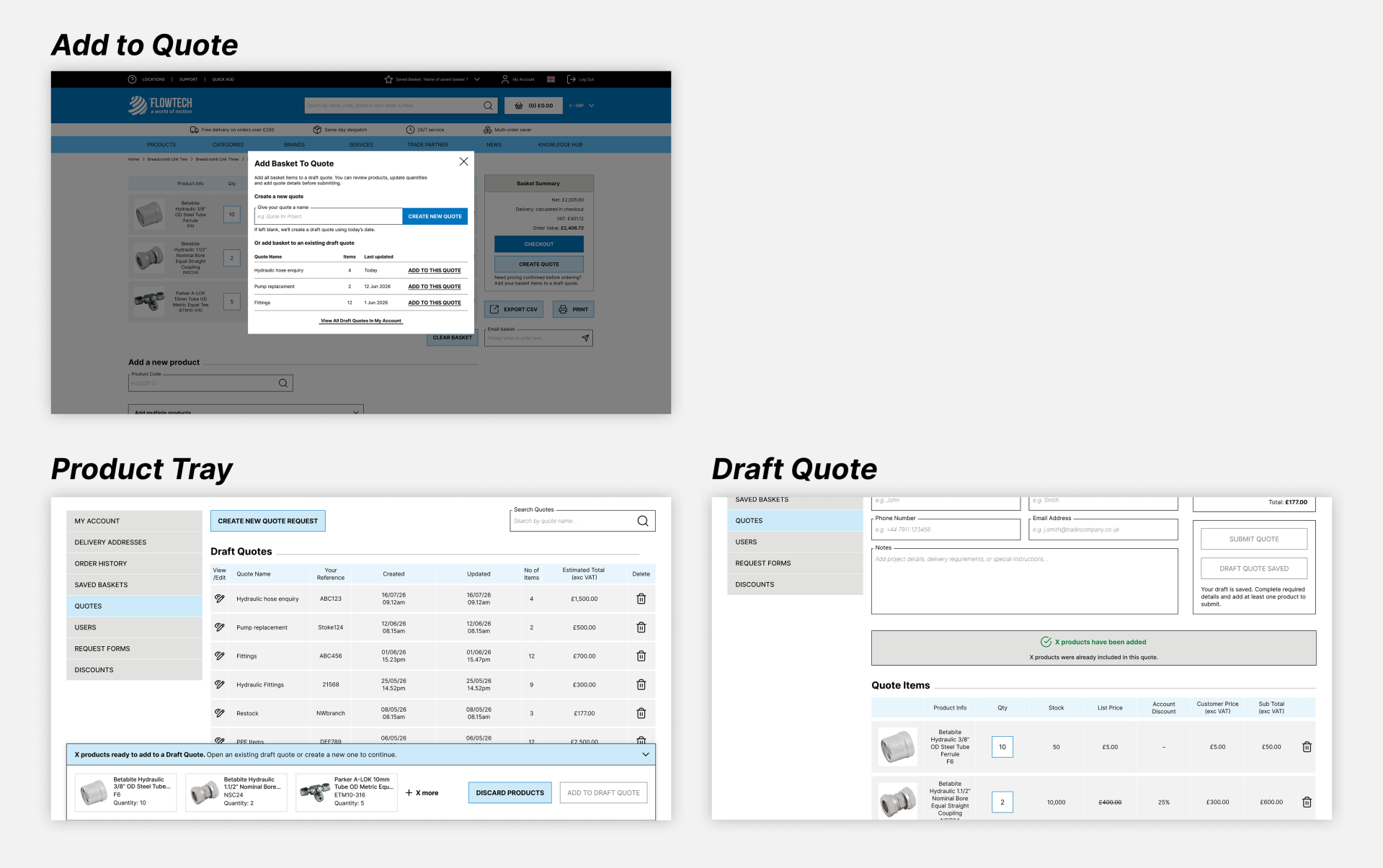
Draft proposal, desktop; awaiting team review
At a glance
Role: UX Designer
Product: Flowtech B2B e-commerce and omnichannel quoting
Scope: existing Sales process, proposed internal workflow, and customer-facing quoting across PDP, Basket, Multi-line Quick Add, Saved Baskets and My Account
Timeline: May 2026 – ongoing
My contribution: solution research, competitor benchmarking, internal-system screen analysis, process mapping, content mapping, user flows, interaction design, desktop wireframes, UX writing, annotations and open-question management
Collaboration: project panager, business analysts, developers, architecture, integration engineers, QA lead, e-commerce, IT, customer experience, head of programs and business systems
Status: comprehensive draft desktop proposal; wider-team review, mobile design, final requirements, implementation and validation still pending
The business problem
The existing quote process is largely manual. Requests arrive through different channels, Sales has to assemble the necessary account, product, pricing, availability and lead-time information, and the resulting data is not captured consistently in one place.
That creates two connected problems. Customers cannot self-serve for straightforward requests or see their quote history online. Internally, Flowtech has limited visibility of how many quotes are requested, how quickly they are handled, which opportunities convert, and why others are lost. The existing ERP interface also requires experience to navigate and does not always surface the information Sales needs in a clear, consolidated way.
Projected opportunity
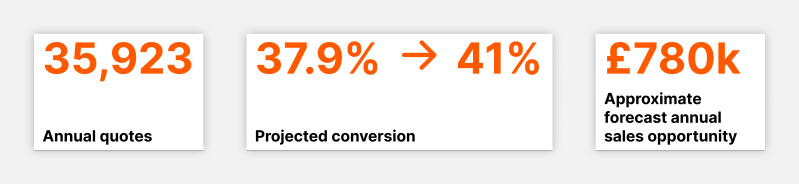
Business-case forecast, not an achieved outcome
The business case estimated the scale of the opportunity using 35,923 annual quotes, an average value of £734.90, and a projected conversion increase from 37.9% to 41%. This produced a cased annual sales opportunity of approximately £780k. It also projected capacity equivalent to 2.9 FTE, an increase in sales per FTE from £236k to £250k, and payback on £125k capital expenditure within six months. Because Flowtech has never had online quoting, these are forecast benefits rather than achieved results. The conversion uplift, capacity release and payback assumptions would all need to be replaced with post-launch evidence.
Researching the solution space
Before moving into wireframes, I reviewed out-of-the-box quoting approaches from Adobe Commerce and OroB2B, benchmarked comparable B2B experiences where access allowed, and consulted UX and B2B commerce resources from Salesforce, SwiftOtter, McKinsey and Liip.
Research snapshot
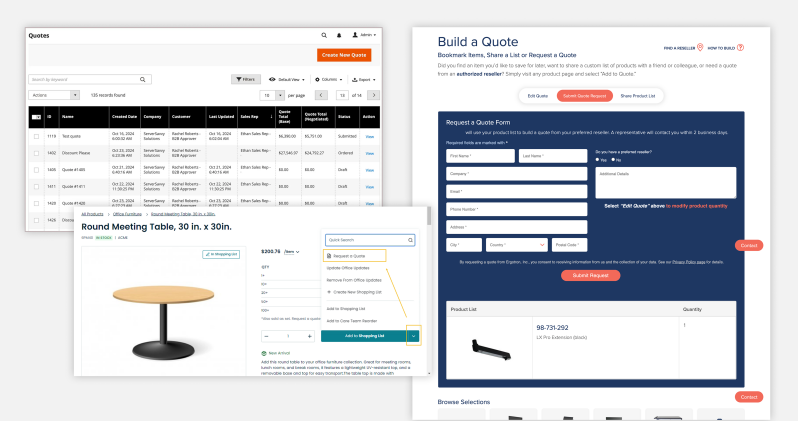
Benchmarking was constrained because many enterprise-scale quoting tools sit behind registered customer accounts. That limited how much of their end-to-end behaviour could be observed, but it still helped me identify recurring expectations: customers need a clear route from product selection into a quote, a way to manage drafts and revisions, visible statuses, and an understandable transition from accepted quote to order.
This was desk research rather than customer research. It provided patterns and questions to investigate, not proof that a particular approach would work for Flowtech customers.
Understanding how Sales creates a quote
I then analysed the internal screens used when a customer contacts Sales by phone or email. I broke the process into five areas: finding the customer or an existing quote, entering quote details, adding and managing products, adjusting pricing, and reviewing and saving or sending the final quote.
Existing process for Sales team

The analysis showed how much knowledge was distributed across the interface. Sales may need to search using account details or product references, review stock and pricing history, find alternative products, apply customer terms or quantity breaks, add line-level notes and required dates, check margin controls, select carriage, and decide whether to save or send the quote.
I converted this into a content map that separated what appeared essential, what could be simplified, and what still needed validation. I also mapped the current Sales journey and proposed a clearer Order Entry workflow, with customer and quote search brought together, related information grouped more logically, supporting data surfaced in context, and a distinct review stage before the quote was saved or sent.
Current versus proposed Sales flows
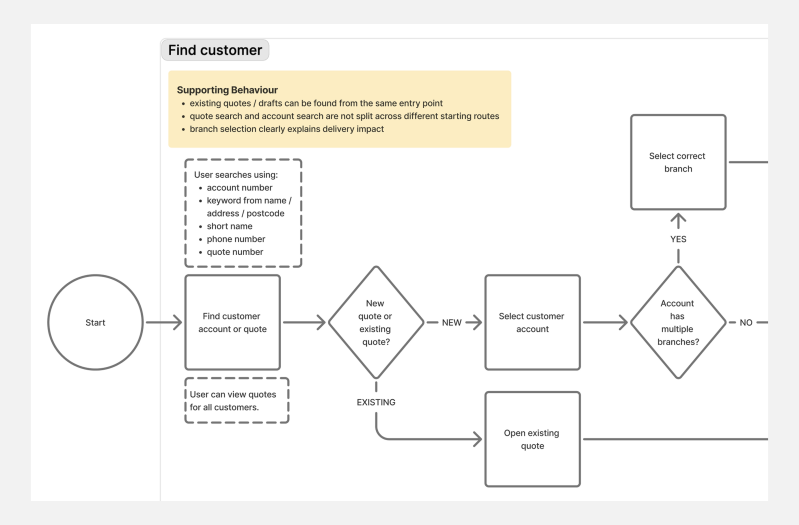
Earlier internal direction, superseded before design review. Click here to see full user flows.
Responding to a change in direction
The original plan was to release the new experience to Sales first by surfacing quoting within Flowtech's internal Order Entry website instead of asking them to work directly in the ERP system. The direction later changed towards exploring an out-of-the-box solution for Sales. I did not have access to that platform or contribute to its design.
Rather than continuing to develop an internal interface that might not be built, I moved my focus to the customer-facing Flowtech website. The earlier work remained useful: the internal-system analysis and content map gave me a clearer understanding of the information, decisions and exceptions that would still exist behind a customer quote.
This pivot changed the screens I was designing, but not the underlying problem. The customer experience still needed to connect product selection, account rules, Sales review and eventual purchase without exposing the complexity of the internal process.
Designing for several starting points
Customers do not always decide they need a quote from the same place. The proposed experience therefore supported five entry points:
- A single product on a Product Detail Page.
- The contents of the live Basket.
- A product list entered through Multi-line Quick Add.
- The contents of a Saved Basket.
- A new empty quote created from My Account.
For the first four routes, I designed a reusable Add to Quote modal. It allowed the customer to create a new quote, choose from up to three recent editable drafts, or view all draft quotes in My Account. Creating a quote directly within My Account bypassed the modal and opened an empty quote page.
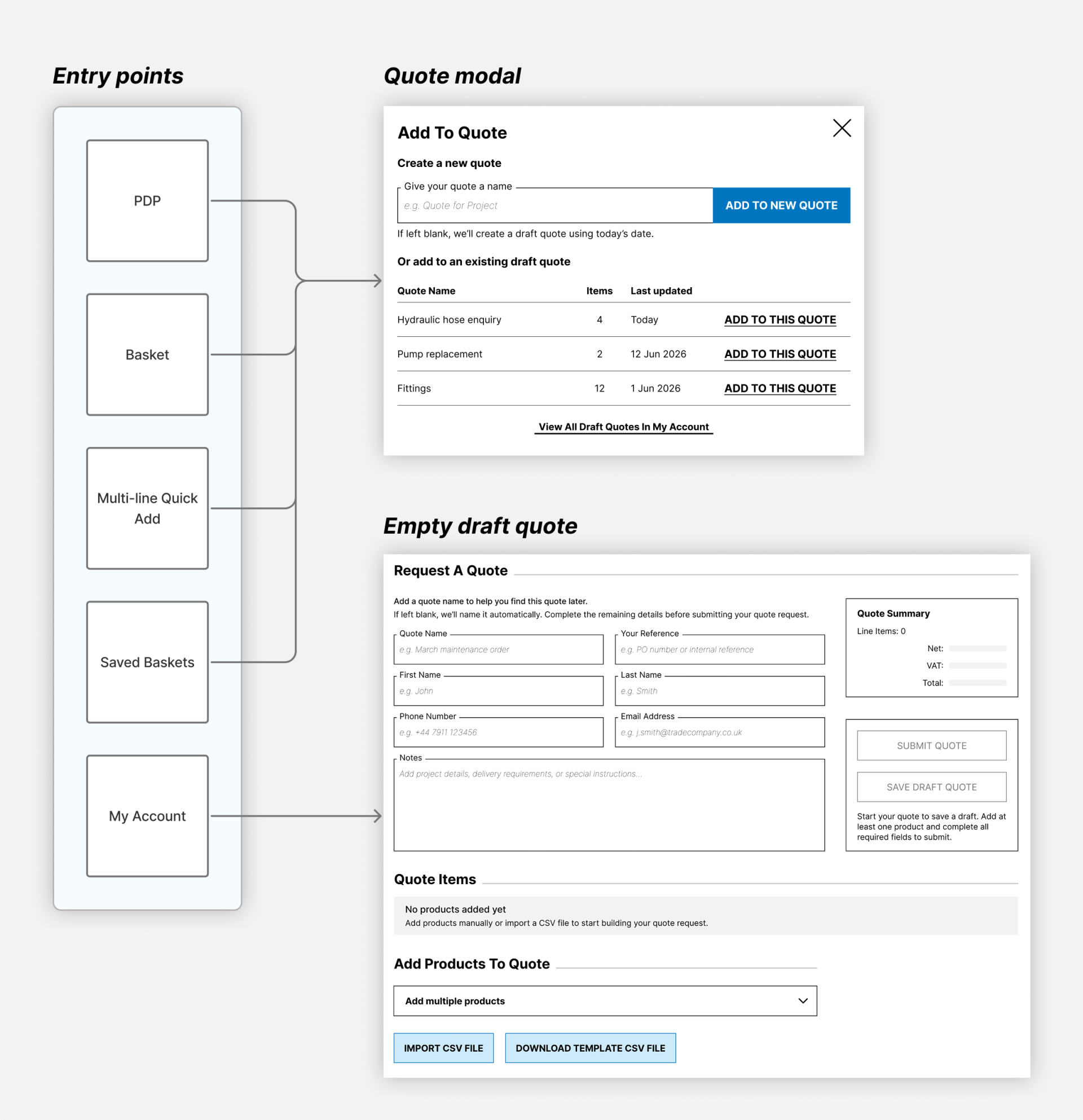
The entry points shared a pattern, but not every source behaved identically. A PDP represents one product that may legitimately be used in more than one draft. Basket, Multi-line Quick Add and Saved Basket represent complete product sets, potentially containing dozens or hundreds of lines. The draft proposal therefore treated bulk selections more cautiously and avoided silently merging or repeatedly transferring them.
These rules remain working assumptions. They need to be checked against customer behaviour, business requirements and the technical model of the chosen platform.
I worked desktop-first because most Flowtech customers use the website on desktop, particularly for complex account and purchasing tasks. Responsive and mobile behaviour would follow once the core requirements and desktop journey had been reviewed, rather than extending an unconfirmed model across every breakpoint.
Bridging the journey with a Product Tray
The most complex design problem appeared when a customer selected View all draft quotes. Their products had to survive the move into My Account while they chose an eligible destination, without behaving like a second Basket or creating a quote before the customer intended to.
I designed a temporary Product Tray to bridge that gap. It held the selected products during the authenticated session and guided the customer to open an editable draft or create a new one. The Add CTA only became available once a valid destination had been chosen. The proposal cleared the tray after successful addition, explicit discard, logout or session expiry.
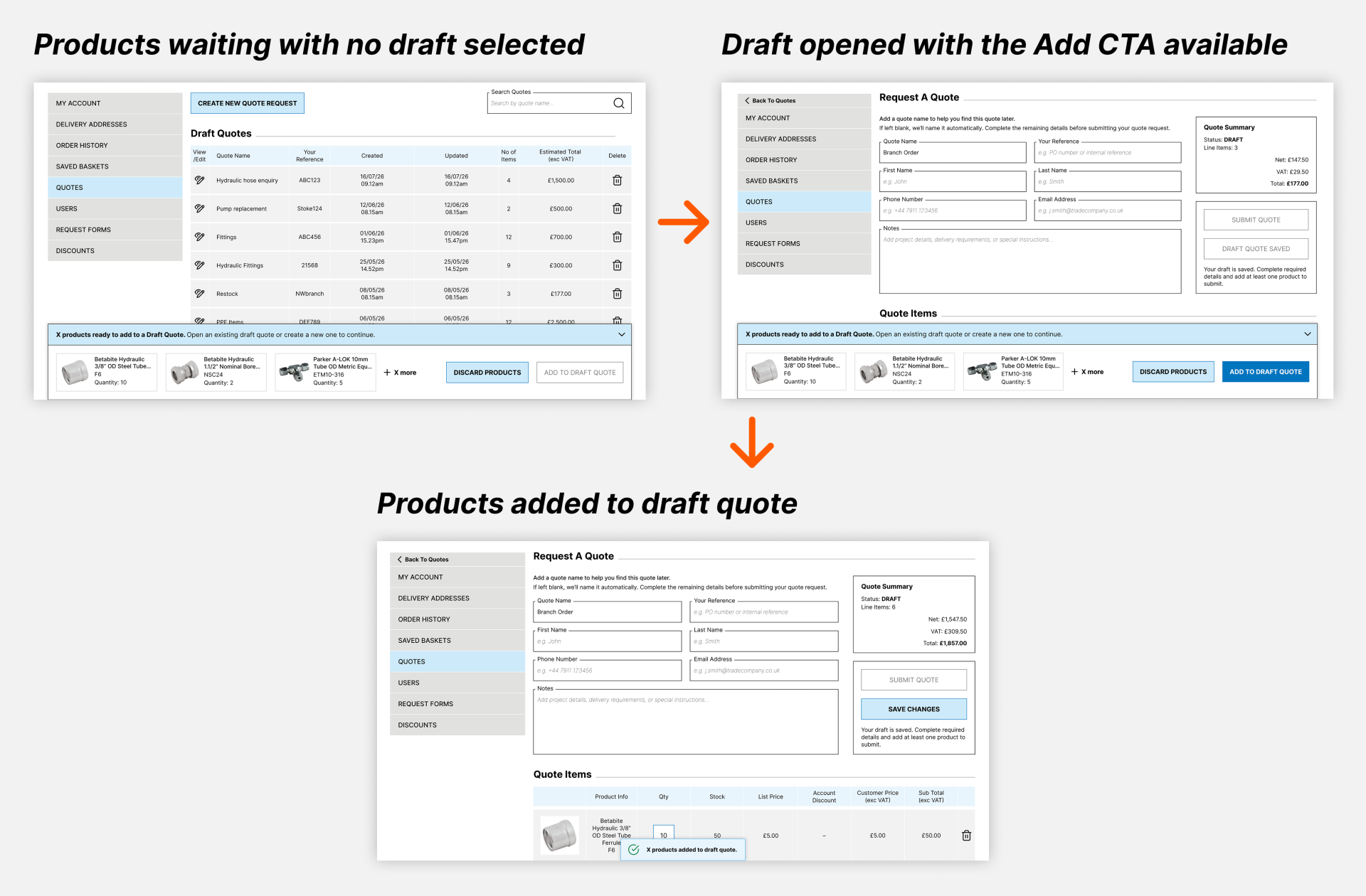
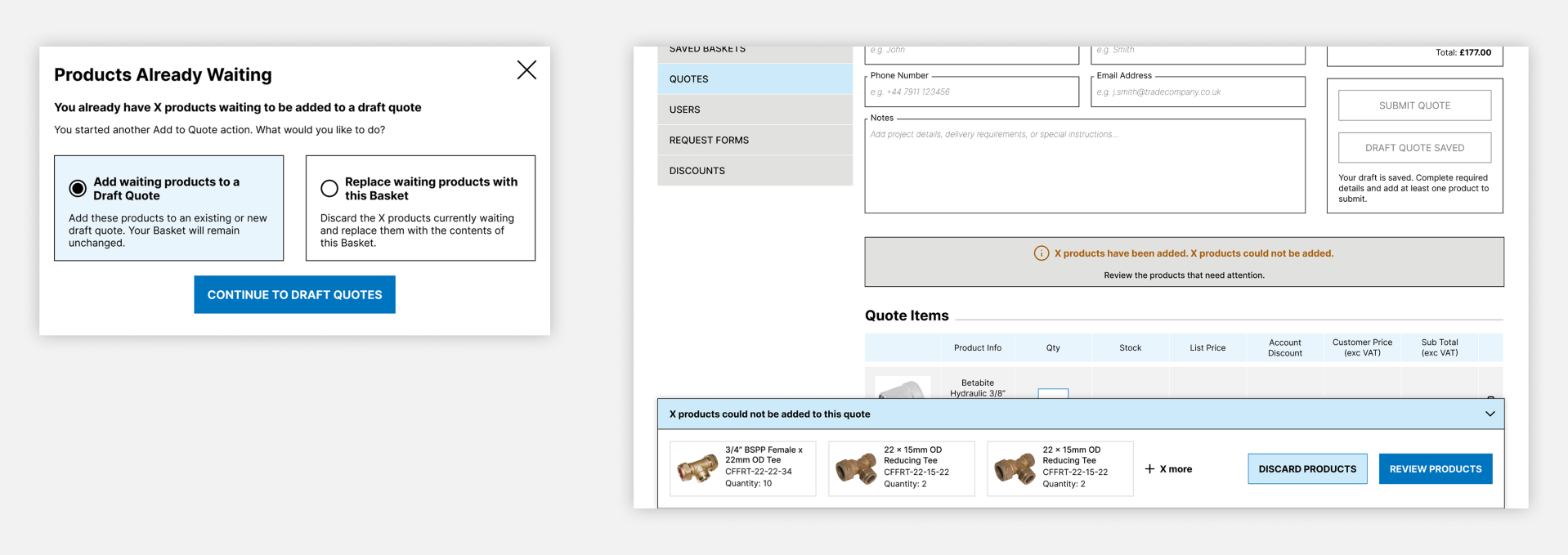
The tray also needed to coexist with every entry point. If a customer began another Add to Quote journey while products were already waiting, the interface presented an explicit choice to keep the current selection, replace it with the new selection, or close the modal without changing anything. Products were never silently merged, replaced or lost.
This interaction became a small system in its own right. I defined how it should handle an ineligible destination, duplicates, partial success, complete failure and intentional discard. Eligible products could be added while unresolved products remained available. Existing quote quantities were not changed automatically, and retry actions were reserved for failures that could genuinely be temporary.
Conflict and recovery
Making the quote lifecycle understandable
The shared destination was a Request a Quote page where customers could add or remove products, change quantities, complete quote details, save a draft and return later, or submit the request to Sales.
I separated the lifecycle state from the editing state. A new, unsaved quote was not labelled Draft until it had been deliberately saved. A saved draft remained editable, with unsaved changes made visible. Submission was a significant transition: the quote became read-only, confirmation was shown, and the customer would be notified by email when Sales responded.
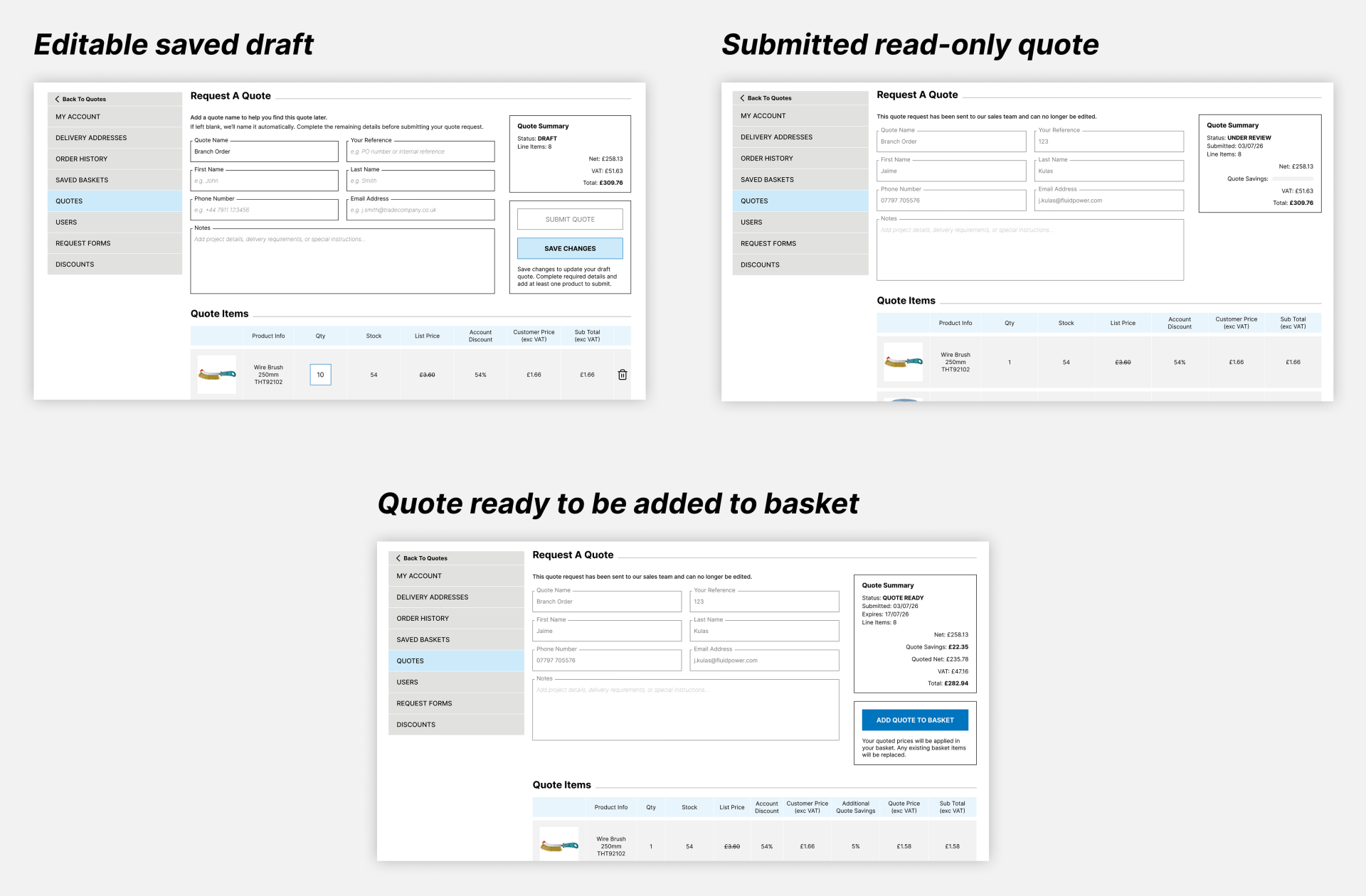
The proposed end-to-end journey was:
Choose products → create or select a draft → build and save the quote → submit → Sales review → quote ready → add to Basket → Checkout
I also documented behaviour for leaving with unsaved changes, duplicate products, quote submission errors, partial product failures, replacing an existing Basket during quote-to-order conversion, and the distinction between temporary and permanent problems.
Working with incomplete requirements
The project still contained significant unanswered questions: which customers would have access, whether all entry points belonged in the first release, which products were eligible, how POA products should be handled, final form fields and statuses, quote ownership within customer accounts, pricing and expiry rules, how Sales would request more information, and how the quote-to-order handoff would behave.
Rather than hiding those gaps, I created a living questions and decisions log. I separated blockers from questions needed later, named suggested owners, and annotated the wireframes wherever behaviour depended on business or technical confirmation.
This allowed the proposal to become comprehensive without presenting assumptions as settled requirements. It also gave stakeholders something concrete to review when the project was ready for wider discussion.
What would be measured
There are no design outcomes yet because the proposal has not been reviewed, tested or implemented. If the service progresses, the first measurement priority would be to replace the business-case assumptions with actual behaviour.
I would measure:
- Quote conversion against the **37.9%** baseline, segmented by customer type and entry point.
- Quote starts, draft saves, submissions and abandonment through the customer journey.
- Quote response time and cost to serve.
- Quote-to-order conversion and time from request to purchase.
- Product and validation failures, including where selections are abandoned in the Product Tray.
- Sales time spent creating straightforward quotes and sales per FTE.
Margin, duplicate quote creation, existing e-commerce conversion and Sales handling of complex enquiries would provide useful guardrails. A target such as 41% conversion should remain a hypothesis until the service has a reliable post-launch baseline.
What I learned
The most difficult part of this project was not an individual screen. It was designing the transitions between different product sources, temporary selections, quote states and internal processes while key requirements were still changing.
Analysing the internal Sales interface before designing helped me avoid treating online quoting as a simple form. The internal process contains pricing controls, product alternatives, availability decisions and exceptions that the customer experience must either support or absorb behind the scenes.
The scope change also reinforced the value of separating problem understanding from a particular solution. The proposed Sales interface was superseded, but the research, content map and current-state analysis continued to inform the customer journey.
Most importantly, the work reminded me to make uncertainty visible. This is a detailed and considered proposal, but it is still a proposal. The next meaningful step is not polishing every remaining state; it is reviewing the assumptions with Sales, Product and technical stakeholders, confirming the business rules, and then testing the core journeys with customers.